

Every year, thousands of students with CUET scores sufficient for Hindu, Hansraj, or LSR don’t secure admission— and it has nothing to do with their marks. They lose seats inside the CSAS portal, in seven specific ways, in the three weeks between registration and final allocation. The portal opened this week. Here’s what everyone of them did wrong — and what you’ll do differently.
⚡ If You Read Nothing Else, Remember These 5 Things
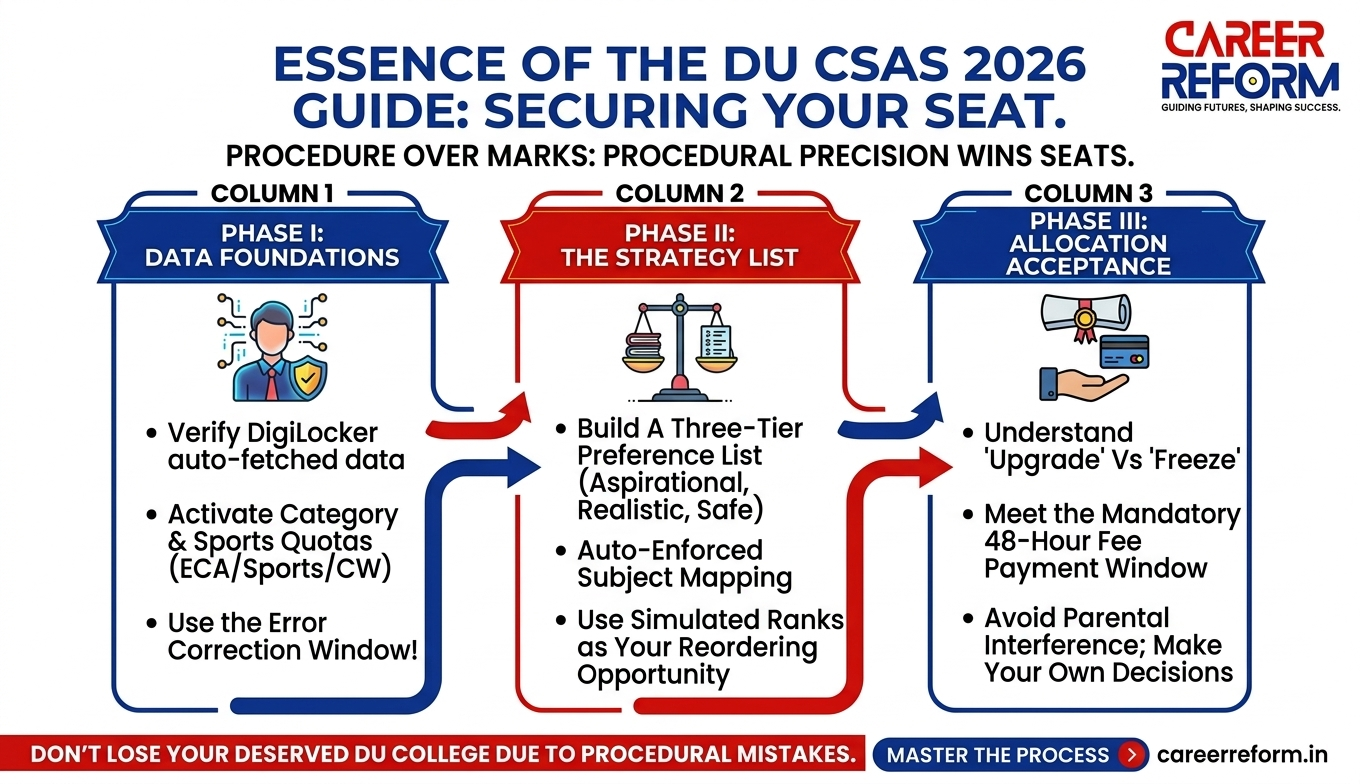
- Verify your DigiLocker auto-fetched data within 24 hours of registration.
- Build preferences across three tiers — aspirational, realistic, and safe.
- Use the Simulated Rank window to reorder before allocation.
- Never miss the 48-hour fee payment window after seat allocation.
- “Understand what ‘Upgrade’ really means before clicking it — a better allocation can automatically replace your current seat.”
The CSAS Portal Just Opened. Here’s What’s Actually New in 2026.
Three changes matter this year.
- DigiLocker + API Setu integration. For many students, the portal may auto-fetch board marks, category details, and date of birth through Digilocker. Whether or not it pulls your data correctly depends on your board’s integration with the system — so treat the auto-fetch as a starting point, not a confirmed fact. More on this in Mistake #4.
- NEP 2020 one-year vs two-year PG split. DU’s four-year UG is now live. Complete it, and you qualify for a two-year PG with full specialisation options. Exit after three years, and you enter a one-year PG with fewer. You don’t decide this now, but it affects how you choose your programme stream in the portal.
- Tightened subject-mapping rule. The 50% similarity threshold between your Class 12 subjects and CUET papers is now auto-enforced. If the mapping breaks, the portal flags you as ineligible before you reach the merit list — with no manual correction afterwards.
⚠️ Timeline Disclaimer: The schedule below is based on previous DU CSAS cycles and available 2026 guidance. Official dates will only be confirmed on the University of Delhi admission portal at ugadmission.uod.ac.in after CUET UG 2026 results are declared. Check the portal daily once the results are out.
2026 Expected Timeline
| Phase | What Happens | Expected Window |
| Phase I | CSAS registration opens | Within days of CUET result (~late June) |
| Phase II | Subject mapping + preference filling | ~7–10 days after Phase I |
| Preference auto-lock | Portal locks your last saved order | End of Phase II deadline |
| Simulated rank release | Tentative rank + brief re-order window | ~2–3 days after auto-lock |
| Round 1 allocation | First seat list released | ~July 2026 |
| Round 1 acceptance + fee | Accept / Freeze / Upgrade + pay fee | ~48 hours after Round 1 |
| Round 2 allocation | Second list for upgrades + vacant seats | ~1 week after Round 1 closes |
| Round 3 allocation | Final regular round — includes ECA/Sports/CW | ~2–3 weeks after Round 2 |
| Spot rounds | Vacant seats; mid-entry option opens | After Round 3 |
Three actions to take now:
- Register in Phase I the day the portal opens — do not wait for Phase II.
- Use the Simulated Rank window to reorder; it is your only second chance before allocation.
- Bookmark the DU UG Admissions Portal— every deadline update appears there first.
Mistake #1: The Subject Mapping Trap
The rule: at least 50% of your Class 12 subjects must correspond to the CUET domain papers you appeared for. If the match breaks, you disappear from the merit list for that course — at every college.
The Commerce Student Who Lost SRCC
A student studied Maths in Class 12 but skipped the Mathematics CUET paper, worried that a weak score would hurt her. B.Com (Hons) at SRCC requires Maths as a mapped CUET subject. Her percentile was strong. She was never considered for the SRCC merit list.
Fix: before listing any preference, open the DU Programme Eligibility page for that programme. Match against the CUET papers you actually appeared for — not what you studied in Class 12.
The Non-Obvious Mapping You Must Know
Biochemistry studied in Class 12 maps to the Biology CUET paper for B.Sc (Hons) Biochemistry eligibility. If you appeared for Biology in CUET, you are eligible. If you assumed a separate Biochemistry CUET paper existed and skipped Biology, you are not eligible.
Where to do this in the portal: in Phase II, go to Subject Mapping under Programme Eligibility on the CSAS Portal. The portal lists every programme you are eligible for based on your mapped papers. If a programme you want does not appear, the mapping is broken — fix it before moving to preference filling.
Subject Mapping Reference Table (Always verify at admission.uod.ac.in — mappings can change annually)
| Class 12 Subjects | CUET Paper(s) Needed | DU Programmes |
| Mathematics | Mathematics | B.Sc Maths, B.Com (H), B.A. Economics |
| Physics + Chemistry + Maths | PCM domain papers | B.Sc Physics, B.Sc Chemistry |
| Physics + Chemistry + Biology | PCB domain papers | B.Sc Zoology, B.Sc Botany, B.Sc Biochemistry |
| Biochemistry (Class 12) | Biology (CUET) | B.Sc Biochemistry — mapped equivalent |
| Accountancy + Eco + B.St | Acc / B.St / Economics | B.Com (H), BMS — SRCC, Hansraj, Hindu |
| History + Pol Sci + Geo | Matching domain papers | B.A. History, B.A. Pol Sci — Miranda, IP College |
| English + Humanities | English + domain | B.A. English, B.A. Programme — LSR, Gargi |
| Commerce without Maths | B.St / Accountancy only | B.Com eligible; SRCC B.Com (H) needs Maths |
| Psychology + Sociology | Psychology / Sociology | B.A. Psychology — Gargi, Sri Venkateswara |
| Fine Arts / Music | Domain taken in CUET | B.A. Fine Arts / Music — verify per programme |
Mistake #2: The Upgrade Window That Unintentionally Costs You Your Seat
After allocation, the portal gives you three options: Accept & Freeze, Accept & Upgrade, or Reject. Freeze and Reject are clear. Upgrade is where students unintentionally lose confirmed seats.
What Upgrade actually means: if a higher-preference seat opens in the next round, your current seat is automatically cancelled and replaced. If nothing opens up, you keep what you have.
What students think it means: they keep their current seat and get placed on a waitlist. That is not how it works. Students have unintentionally given up confirmed seats at Ramjas and Kirori Mal, waiting for SRCC rounds that never moved.
Many students miss this detail: students have reported different outcomes across admission cycles, so never rely on inactivity. Log in and choose deliberately within the acceptance window every single round.
The Decision
- Allocated your #1 preference? FREEZE immediately.
- Allocated #2–5 and happy with it? FREEZE.
- Allocated #2–5, and Round 2 shows historical movement for your programme? UPGRADE — but verify with last year’s round-wise cutoff data first.
- Allocated something well below your realistic range? UPGRADE — only if movement is historically realistic.
- Unsure? Log in. Choose one. Do not leave the window blank.
Mistake #3: Preference Order Based on Pride, Not Probability
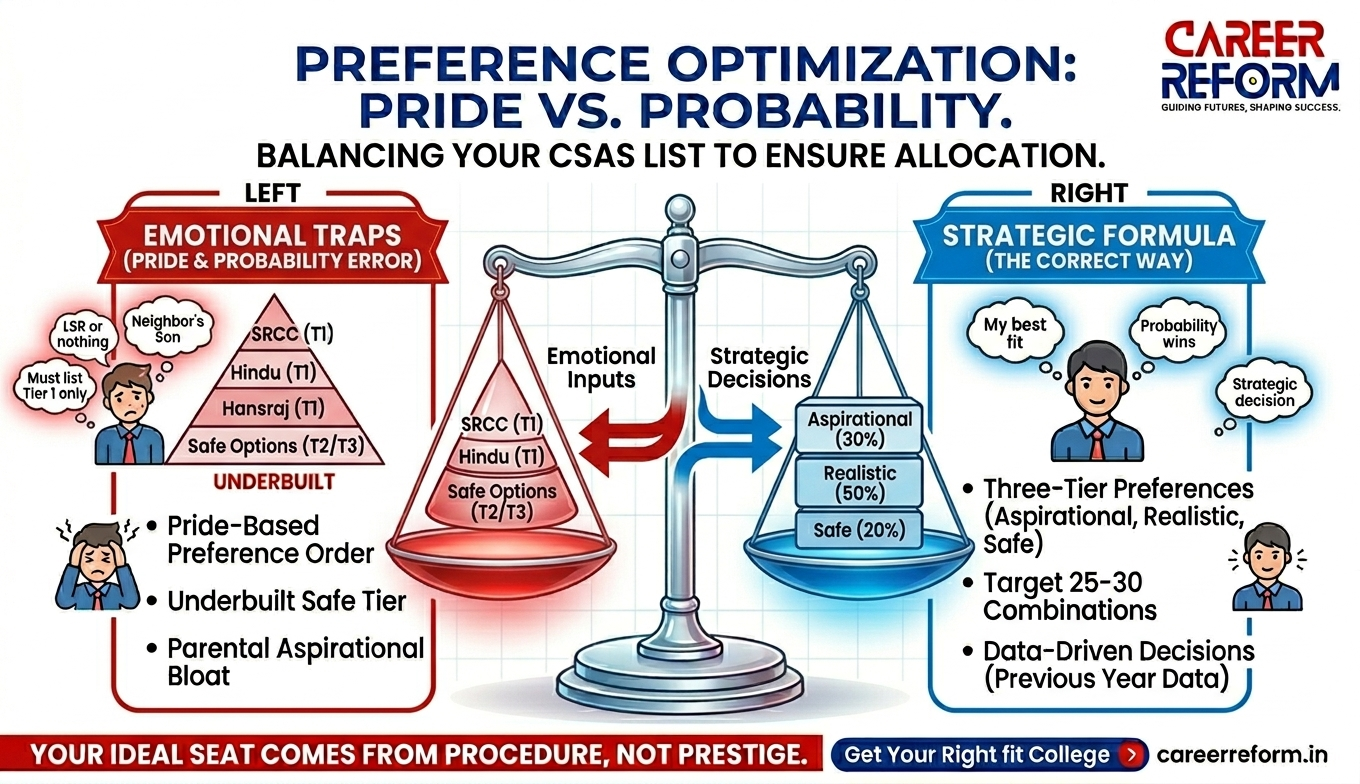
Most students list 30 preferences in social-prestige order — SRCC, Hindu, Hansraj, LSR, Miranda House — and add three safe options at the end as an afterthought. The result: the safe tier is under built, and students end up with no allocation instead of a second-tier college that would have served them well.
Build Your List in Three Tiers
- Aspirational (top 20–30% of list): cutoffs 3–8 percentile points above your score. Worth listing; low probability.
- Realistic (middle 40–50%): cutoffs within ±3 points. This is where your seat most likely comes from.
- Safe (bottom 20–30%): cutoffs 4–10 points below your score. Your guaranteed allocation if higher rounds don’t move.
Sample Preference Order — B.Com (Hons), ~93rd Percentile (Illustrative only. Cross-reference with CSAS 2025 cutoff data at ugadmission.uod.ac.in)
| # | College & Course | Tier | Why |
| 1 | SRCC – B.Com (H) | Aspirational | Highest prestige; low probability |
| 2 | Hindu College – B.Com (H) | Aspirational | Slightly lower cutoff than SRCC |
| 3 | Hansraj – B.Com (H) | Aspirational | Strong commerce department |
| 4 | Ramjas – B.Com (H) | Realistic | Historical cutoff ~94–95%ile |
| 5 | Kirori Mal – B.Com (H) | Realistic | Consistent scores needed |
| 6 | Sri Venkateswara – B.Com (H) | Realistic | South Campus; good placements |
| 7 | Daulat Ram – B.Com (H) | Realistic | Women’s college; strong faculty |
| 8 | Gargi – B.Com (H) | Realistic | South Campus women’s college |
| 9 | Indraprastha College – B.Com (H) | Safe | Lower historical cutoffs |
| 10 | Ramjas – B.Com (Programme) | Safe | Fallback if Hons unavailable |
| 11–20 | Repeat pattern for B.A. (H) Economics / BMS across realistic + safe colleges | Safe–Realistic | Broaden programme coverage, not just college names |
| 21–30 | Evening programme combinations at realistic colleges | Safe | Still a full DU degree |
Key rule: target 25–30 total preferences. Never let social prestige override probability.
Mistake #4: Trusting the DigiLocker Auto-Fetch Without Verifying
For many students, the portal may auto-fetch three things: your reservation category, date of birth, and Class 12 marks. Whether this works accurately depends on your board’s integration with DigiLocker — so verify all three within 24 hours of registration, regardless.
Where to find it: after logging in to your CSAS dashboard, go to My Profile → Personal Details. Review every field before confirming registration.
- Category: verify the specific sub-category (OBC-NCL, EWS, PwD sub-type). A wrong category found at document verification can cancel your admission.
- Date of Birth: affects age-based eligibility for some programmes and DU sports quotas. An incorrect DOB causes downstream errors that are hard to correct after allocation.
- Class 12 marks: used for tie-breaking. If your school issued a corrected marksheet or you cleared a compartment exam, the auto-fetched figure may reflect the old result.
If the Data Is Wrong
DU opens a correction window for a limited period after Phase I closes — typically a few days before Phase II ends. Log in to ugadmission.uod.ac.in, go to your dashboard, and use the correction facility. If the online correction does not go through, carry physical documents to the DU grievance desk.
Important: corrections made after seat allocation are treated as discrepancies, not updates. They flag your file and can delay final admission by weeks.
Mistake #5: Ignoring the Tie-Breaker Rule
When two candidates have the same CUET percentile for the same college-course, Class 12 board marks decide who gets the seat.
- Step 1 — Best of 3 subjects: top three board scores averaged
- Step 2 — Best of 4: fourth-highest subject added if still tied
- Step 3 — Best of 5: fifth subject included if needed
- Step 4 — Age: older candidate gets priority if everything above is equal
Why This Still Matters in 2026
At high-competition programmes — B.A. (Hons) History at Miranda House, B.A. (Hons) Psychology at Gargi, B.Com at Sri Venkateswara — final-round cutoffs can compress into a 2-percentile band. In that band, dozens of seats are decided by board marks alone.
How to find last year’s data: go to DU UG Admissions Portal→ Previous Year Data → CSAS 2025 Round-wise Cutoffs. For each of your top 10 preferences, check the Round 3 cutoff range. If it spans under 2 percentile points, calculate your Best of Three board score now — before preference filling closes.
Mistake #6: Missing the 48-Hour Fee Payment Window
After allocation, you have roughly 48 hours to pay the admission fee. No extension. No appeal. Miss it, and the seat is de-allocated.
How Families Get Caught Out
- Travelling for a wedding — the student cannot access net banking credentials.
- UPI app fails on retry, triggers a fraud alert, and the UPI ID gets temporarily blocked.
- The Bank account requires dual authorisation; the second person is unavailable.
- Net banking was never activated — the family always used branch banking.
- The Student pays on the final day, and the gateway slows under load.
Pre-Payment Actions — Do These Before Allocation
- Make a ₹1 test transaction from your fee-payment account today
- Identify a backup account in case the primary method fails
- The student — not the parent — should know the net banking password and UPI PIN
- Block 3–4 hours on allocation result day; schedule nothing that cannot be interrupted
- If using a demand draft, arrange it at least 24 hours before the deadline
- Save the payment confirmation screenshot and transaction ID in two separate locations
Mistake #7: Letting Your Parents Fill the Form
Every keystroke in the CSAS portal should be yours — or made with you watching and understanding what is being entered and why.
Where Parent Involvement Helps
- Gathering and physically verifying documents and certificates
- Ensuring the fee-payment account is funded and accessible
- A second pair of eyes on the preference list before final submission
- Staying calm on allocation day
Where It Actively Hurts
- Social-proof preferences. “Our neighbour’s son got into Hindu, so put Hindu first.” His score, subjects, and programme were different. His result tells you nothing about yours.
- Aspirational bloat. Parents resist listing colleges they consider beneath expectations. The safe tier is left underbuilt. Students end up with no allocation instead of a solid second-tier college.
- Last-minute changes. Changing the preference order hours before submission because a relative called is one of the most common causes of the wrong programme sitting at #1.
- Upgrade misunderstood. “Choose Upgrade, we’ll get a better college” has cost students confirmed seats at Ramjas and Kirori Mal.
Tell your parents: support the process. Don’t substitute yourself for the student in it.
The Gap Nobody Mentions: Sports, ECA, and CW Quota Seats
If you have achievements in sports, music, debate, NCC, NSS, or are a child or widow of armed forces personnel, you are eligible for supernumerary seats that run on a parallel track inside the same CSAS portal.
- ECA (Extra-Curricular Activities): 14 categories, including Music, Debate, NCC, NSS. Each college reserves 1–5% of total seats. Apply for up to three ECA categories. Upload your best five certificates from the last four years. Preliminary and final trials are conducted by each college.
- Sports: 26 recognised games. Same 1–5% reservation per college. Certificate upload followed by trials.
- CW (Children/Widows of Armed Forces Personnel): 5% supernumerary seats with cutoffs typically 6 percentile points below the regular cutoff for the same programme. No trials — certificate-based only.
How to apply: in Phase I of CSAS registration, tick the relevant supernumerary quota and pay the additional ₹100 fee per quota. Upload certificates at that stage — you cannot add them later.
Critical timing note: ECA and Sports allocations happen in Round 3, not Round 1 or 2. Do not freeze a regular-quota seat in Round 1 or 2 if you are expecting a supernumerary quota result — you may give up a confirmed seat for an allocation that does not come through.
What Happens If You Make a Mistake After Submission?
Students panic about this. Here is what is actually fixable and what is not.
Fixable — During the Correction Window
DU opens a limited correction window after Phase I closes. At ugadmission.uod.ac.in, log in and go to your dashboard to access it. Things you can typically correct during this window:
- Category certificate (re-upload updated documents)
- Academic details where the auto-fetch was wrong
- Some personal detail fields
The correction window usually stays open for only a few days. Check your dashboard daily.
Fixable — Before Preference Auto-Lock
- You can reorder, add, or remove preferences any number of times before the Phase II deadline
- After Simulated Ranks are released, DU opens a brief re-ordering window — use it if your rank is different from what you expected
Not Fixable After Auto-Lock
- The Preference order cannot be changed once the auto-lock triggers at the Phase II deadline
- ECA and Sports quota cannot be added if you did not select them in Phase I — this is a hard cutoff
- You cannot add new college-programme combinations after the preference filing deadline
Not Fixable at All
- Your name, registered email, photograph, signature, and gender cannot be changed at any stage
- Missing the fee payment window after allocation — the seat is gone, with no reinstatement
If You Believe There Is a Genuine Error Post-Allocation
Raise a grievance through the CSAS portal dashboard under the Grievance section. Carry physical originals of all supporting documents. The university reviews these on a case-by-case basis, but errors in personal preference ordering are not considered grievances — they are treated as the candidate’s own choices.
The One Thing the Portal Won’t Tell You
The CSAS portal can match your score to a seat. It cannot tell you whether that programme actually fits your strengths, aptitude, and long-term career direction.
Every year, students get a DU seat and quietly transfer or drop out by Year 2 — because the programme they optimised their CSAS application for was entirely misaligned with how they think and what they are good at.
Career Reform’s Ideal Career Test helps students identify the DU programmes and career paths most aligned with their interests and abilities — before preference filling begins. Take it at careerreform.in/ideal-career-test before finalising your Phase II preference list.
Your Pre-Allocation Checklist
Free DU CSAS 2026 Pre-Allocation Checklist— print it and check every item before each deadline
Key Official Links
| Resource | Official URL |
| DU CSAS Portal — registration, preference filling, seat allocation | ugadmission.uod.ac.in |
| DU Admissions & UG Bulletin of Information | admission.uod.ac.in |
| CUET UG 2026 — results and scorecard (NTA) | cuet.nta.nic.in |
| DigiLocker — verify auto-fetched documents | digilocker.gov.in |
| CareerReform Ideal Career Test | careerreform.in/ideal-career-test |
The CSAS portal will give you a seat. Only you can give yourself the right one.
CareerReform.in | DU Admission 2026 | CSAS Portal Guide
Sania Q